The Construction Operating System

AXIOM QX

Quality Execution

One system. One operator. Complete control over every project, every dollar, every deadline.

3
Portals — Client · Builder · Sub
100%
Automated Notifications
0
Data Entry
Client Portal

Your clients see everything. Without a single phone call.

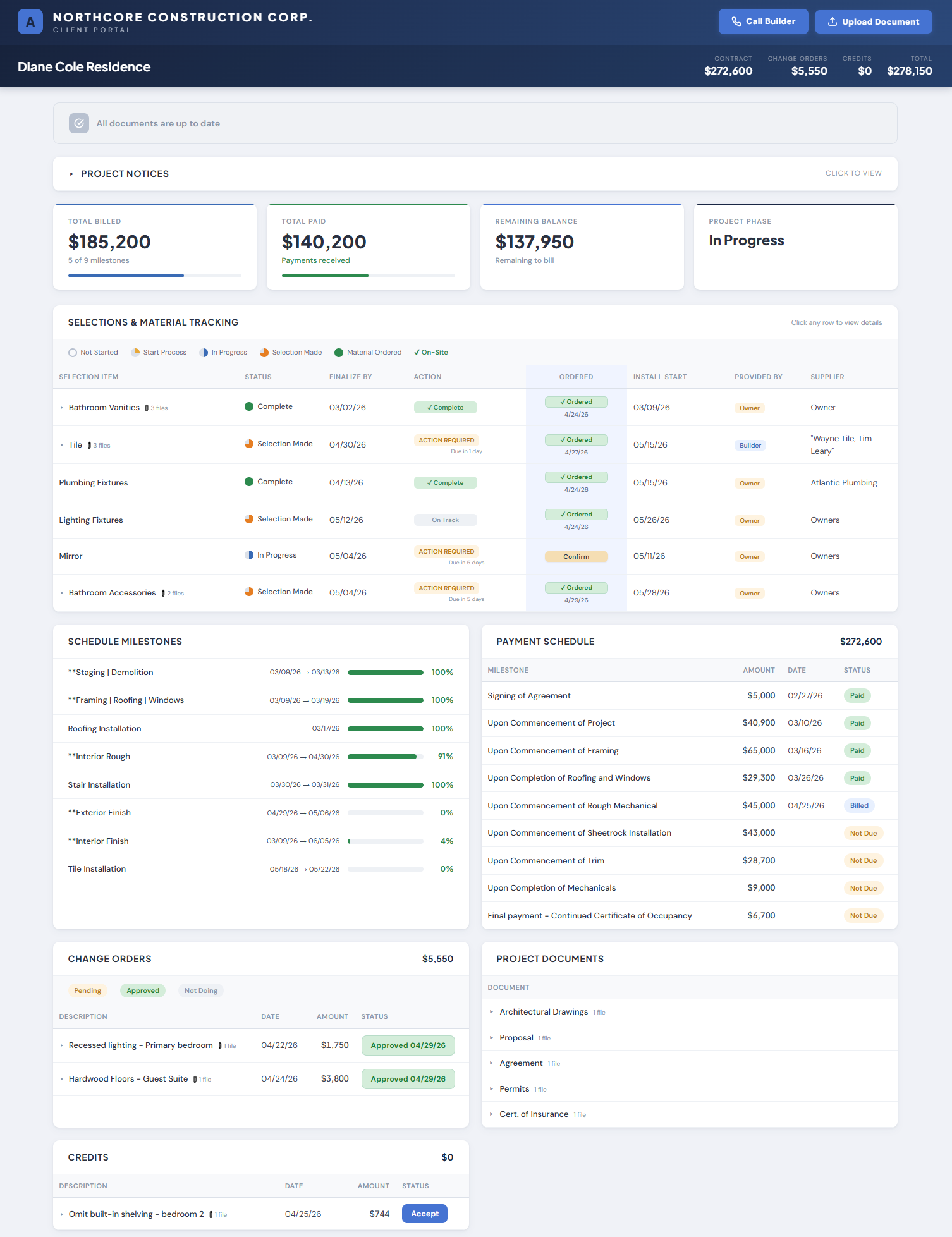
A live portal for every project. Clients check their project schedule, payments, documents, and selections — 24/7. You stop making update calls.

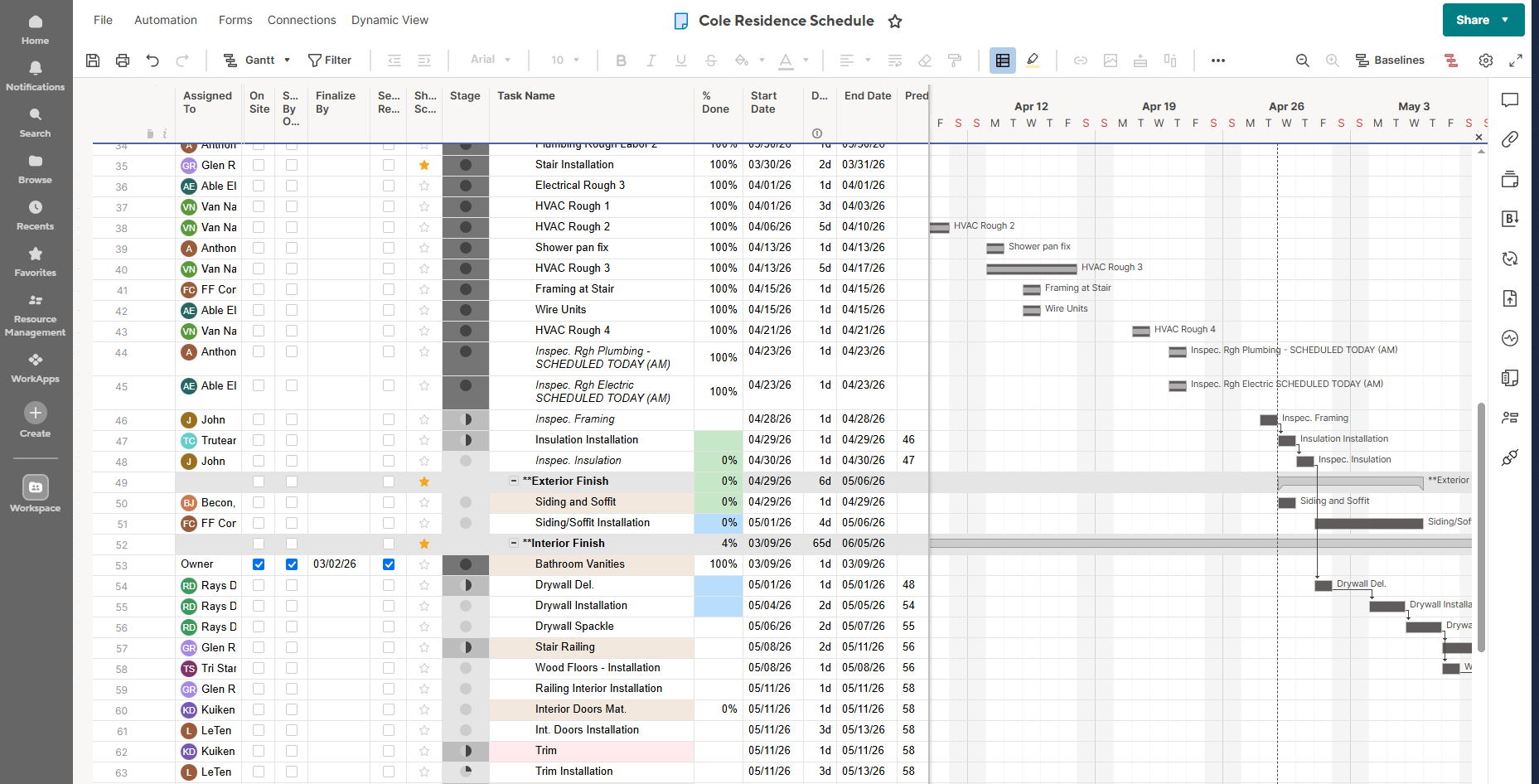
Data powered by Smartsheet

Live Schedule

Milestones with progress bars pulled directly from the Smartsheet Gantt chart. Dates shift automatically when the schedule moves. Always current, zero maintenance.

Payments & Documents

Every draw, status, and amount visible in real time. Documents upload with NEW badges and trigger instant client notification emails.

Selections Tracking

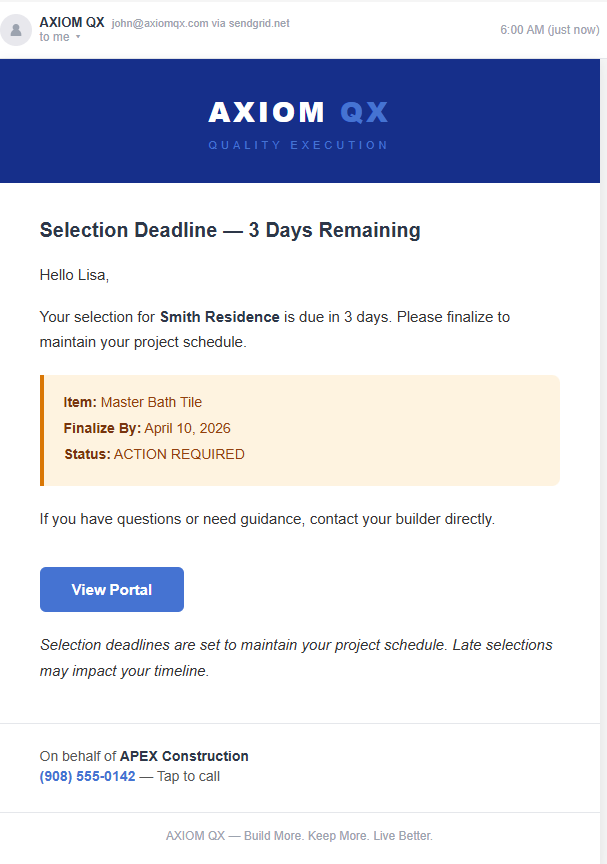
Deadline dates with color-coded status. Green complete, yellow action required, red overdue. Automated escalating alerts fire without any builder involvement.

Change Orders & Credits

Pending, approved, not doing — all visible with amounts and dates. No disputes over what was agreed. No confusion over what was credited.

Project Notices

Post a notice directly to the portal in seconds. Clients see it immediately. No email chains, no missed calls, no he-said-she-said.

Document Management

Green NEW badges on every recent upload. View tracking synced across all devices. Branded notification email fires automatically when a file is added to Smartsheet.

Automation

The system works while you sleep.

The builder works in Smartsheet like they normally do. The system reads it and handles every notification, every reminder, every escalation from there. The builder does nothing extra.

Triggered automatically from Smartsheet

Selection Alerts

5-tier escalation — 7 day, 3 day, overdue. Client and builder notified automatically.

Weekly Report

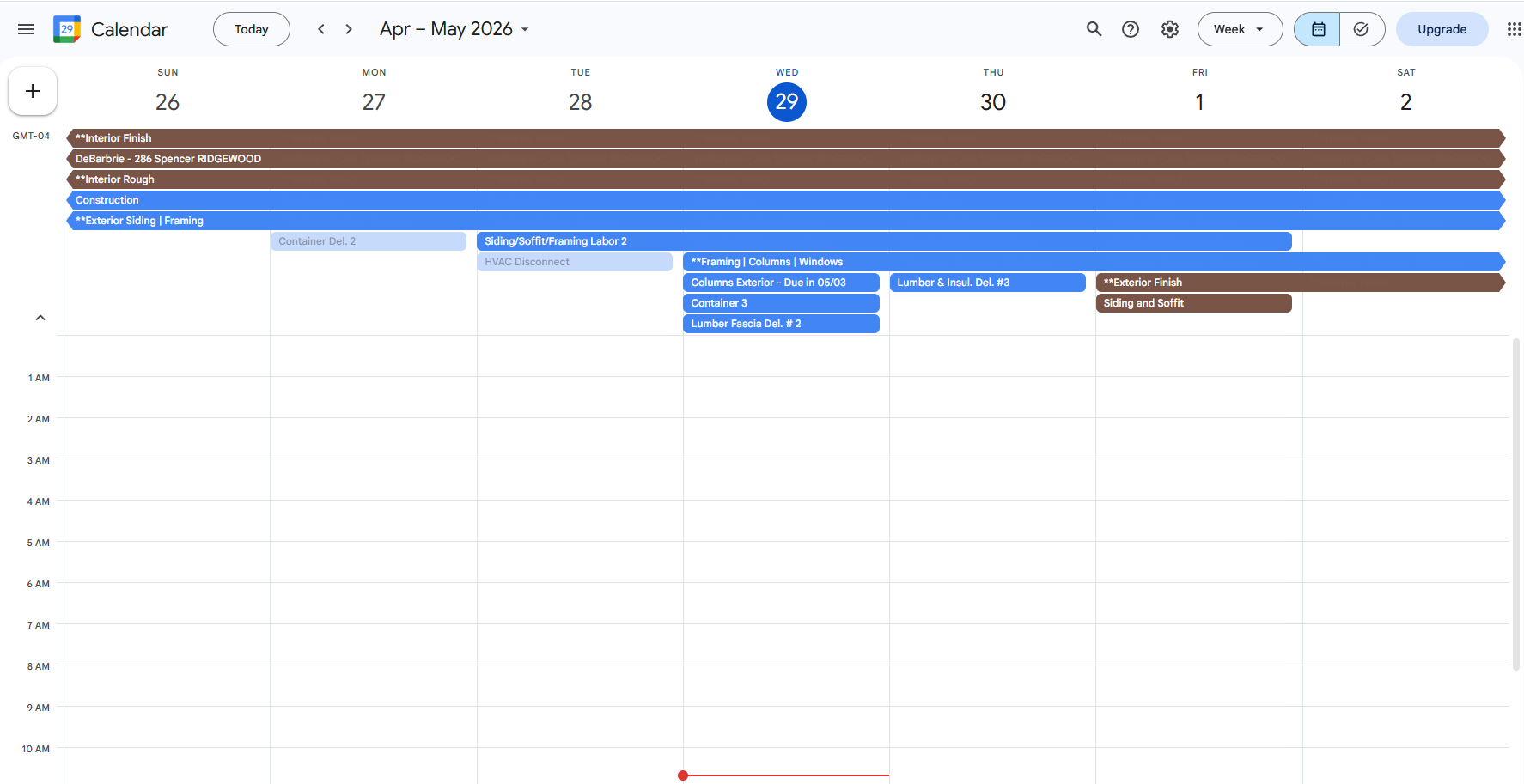
Every Monday at 9 AM, clients get next week's schedule pulled from the Smartsheet Gantt.

Document Emails

Drop a file in Smartsheet. Client gets a branded email instantly. Zero follow-up.

Selection Deadline Alerts

7-day warning. 3-day warning. Overdue Day 1 client only. Day 3 client plus builder. Day 5 delay flag. 5-tier escalation runs on autopilot.

New Document Notifications

Drop a file into Smartsheet. Client gets a branded email instantly — file name, section, date added. Zero phone calls. Zero follow-up.

Monday Morning Weekly Report

Every Monday at 9 AM, clients get the week's scheduled activities pulled directly from the Smartsheet Gantt. Subject to change — no promises made.

NEW Document Badges

Green badge on every new upload. View on phone, badge clears on computer. Tracked server-side — synced across every device automatically.

Completion Confirmations

When a selection is finalized, the client gets a confirmation email with the install date. Closes the loop automatically. No manual follow-up.

Duplicate Prevention

Every alert tracked in the system. Each email sent exactly once per selection per tier. No duplicate notifications. No spam. Clean and professional.

Subcontractor Portal

Your subs see where they are planned on the schedule.

Every subcontractor gets a read-only portal showing their schedule across all your projects. Start dates, durations, progress — live from the Smartsheet Gantt. No email alerts — the schedule moves too much. They check when they need to.

Schedule data from Smartsheet

Cross-Project View

One URL shows every project the sub is assigned to — task name, start date, duration, progress bars. If they're on 4 jobs they see all 4 in one place.

Always Current

Reads directly from the Smartsheet Gantt in real time. Move a date, the sub sees it on their next visit. No phone calls. No schedule texts. No morning coordination calls.

Controlled Access

Deploy one sub at a time. Revoke instantly. Each sub gets a private link — they see only their schedule, only their projects.

Auto-Detection

Subs appear automatically when their email is in the Assigned To column. No data entry. No accounts. No sign-ups. The Smartsheet Gantt IS the database.

One-Click Deploy

Click Deploy — the sub gets a branded email with their portal link. They bookmark it on their phone. No training. No onboarding. No app to download.

No Email Alerts

Intentionally no automated emails to subs. The Smartsheet Gantt moves daily — alerts would overwhelm them. The portal is always current. They check it when they need to plan their week.

Project Tracker

Update your schedule without opening Smartsheet.

Pick a project. See every task organized by phase. Tap to update what's completed. Save it all back to Smartsheet in one batch.

Tap to Update

Tap 0, 25, 50, 75, or 100 on any task. Update 20 tasks in 30 seconds. Faster than opening Smartsheet on a jobsite.

Phase Organization

Every task grouped by phase — Demo, Framing, Rough Mechanicals, Finishes, Punch. Collapse completed phases. See exactly what is active right now.

Batch Save

All changes write back to Smartsheet in one shot. Client portal, selection alerts, and weekly reports all update automatically from there.

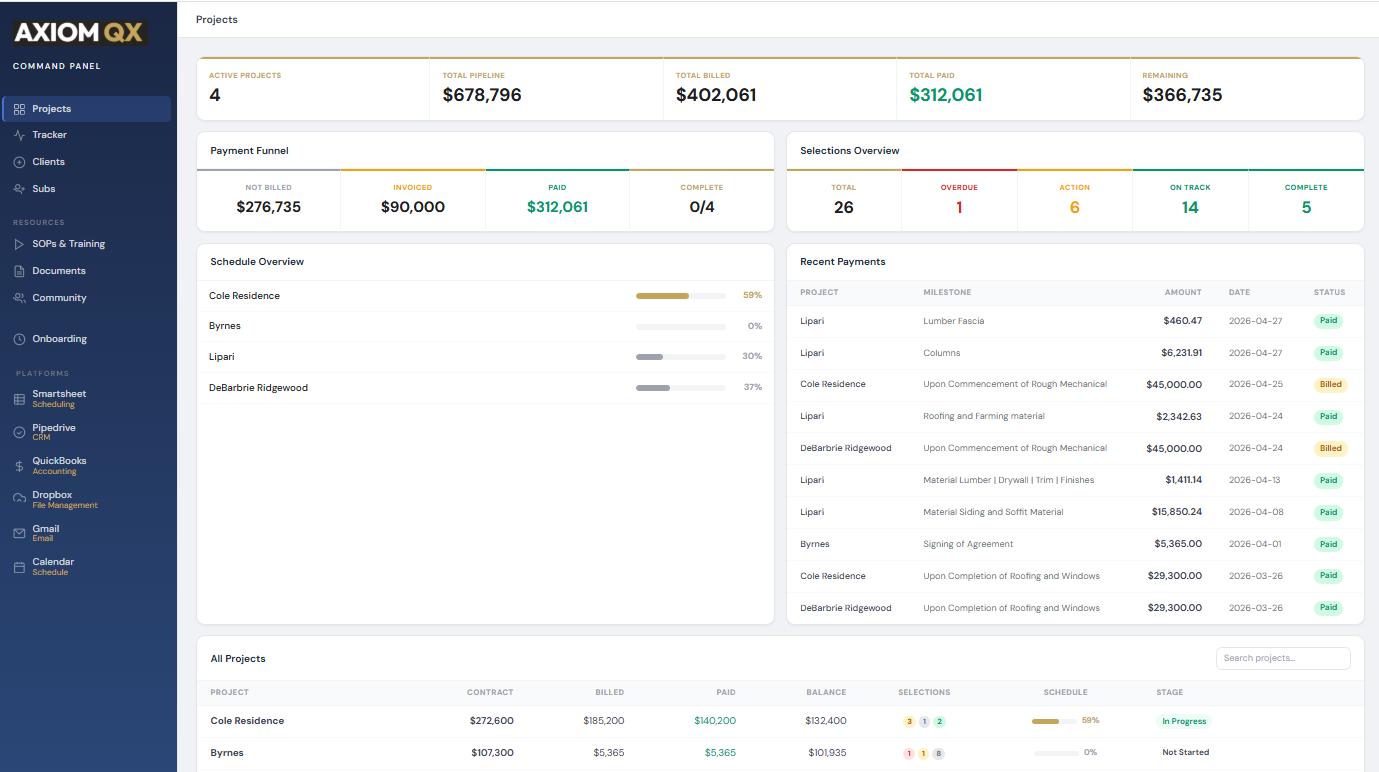
Command Panel

Your entire operation. One screen.

Every project, every dollar, every selection, every deadline. All live.

Template Library

Start every project with a proven schedule.

9 complete project templates built by a contractor with 46 years of experience. Pick your project type. Import into Smartsheet. Start building.

Bathroom Gut Rehab

Full tear-out through final punch. Tile, fixtures, shower glass, vanity, hardware — every client decision tracked with lead times built into the schedule.

Kitchen Gut Rehab

Cabinet layout to final appliance install. Countertop templating sequenced after cabinet set. Backsplash, hardware, lighting — real lead times, no guessing.

New Custom Home

Foundation to move-in. Every phase of a ground-up build — sitework, framing, mechanicals, finishes. Clients select everything. The schedule covers it all.

Addition — 1 & 2 Story

Tie-in to existing structure while the family lives in the home. Foundation, framing, roof cut-in — weather protection and disruption built into every step.

Add-A-Level

The most complex residential project. Roof removal, structural reinforcement, full second floor — with first-floor restoration. Weather-critical sequencing.

Interior Renovation

Occupied home, full gut. Bearing wall removal, rewiring, new layout — kitchen and baths rebuilt while the family lives around construction.

Finished Basement

Moisture assessment and waterproofing first, build second. Radon, egress, bathroom, wet bar — below-grade specs that will not fail in year three.

Roofing Replacement

Clients select type and color. The schedule handles everything else — tear-off, decking, ice and water shield, installation, cleanup, warranty registration.

Tenant Fitup — Office

Glass fronts, AV, furniture with long lead times, fire alarm cert, landlord walkthrough, move-in coordination. Commercial buildout sequenced correctly.

Everything You Need

Builder Resources

Everything to get running and stay sharp. No courses. No fluff. Just direct, useful content.

SOP Video Library

Short, direct videos on how to run each part of the system. Software walkthroughs, construction management workflows, step-by-step guides. Watch it, do it, move on.

Builders Community

Connect with other builders running AXIOM. Share what works, ask questions, see how others are using the system on real projects.

Newsletter

New features, tips for getting more out of the system, and construction management insights. Delivered to your inbox, worth reading.

Getting Started

Connect your platforms, deploy your templates, run your first project through the system. Step-by-step onboarding. Simple and fast.

What Changes

Every feature dramatically lightens the load.

AXIOM does not add headcount. It lets you manage more projects with the team you already have.

01

Project Coordination

Selection tracking, deadline management, client updates, document distribution — the system handles what used to require a dedicated coordinator. Your team focuses on building, not administrating.

02

Office Administration

Document filing, client communication, status updates — dramatically reduced. One person manages the workload that used to require two or three.

03

The Update Phone Calls

5 to 6 hours a week calling clients with status updates. The portal and automated emails handle every one of them. Clients check on their own time.

04

The Follow-Up Emails

"Did you get the plans?" "Have you picked your tile?" "Your draw is due." All automated. All branded. All tracked. That entire workload disappears.

05

Sub Coordination

Subs check their own portal and see where they are planned across every project. The daily phone calls and schedule texts disappear. The schedule is always current.

Your Data. Your Platforms.

You should be able to walk away and take everything with you.

AXIOM never holds your data hostage. Every document, every schedule, every invoice lives in Smartsheet and Dropbox — platforms you own independently.

All-in-One Platforms

$400–$800/month for watered-down versions of everything
30% of what Smartsheet can do
Your operational data is trapped inside their system
Cancel and you lose your schedules, communications, project history
Need a team just to manage the platform
One wrong entry compromises the entire system

AXIOM QX

$129 – $329/month. 100% of Smartsheet's capability.
Your data lives in YOUR accounts — always
Cancel AXIOM and keep everything — it's all in your Smartsheet and Dropbox accounts
One operator runs the entire system
Each tool has one job. Nothing overlaps. Nothing breaks.
Pricing

Simple plans. No surprises. Unlimited uses.

Starter
$149/mo
Up to 5 active projects

100% of every platform's capacity. Full integration with Smartsheet to power your command center, clients, personnel, and vendors.

  • Client portal for every project
  • Subcontractor portal
  • Project tracker
  • Command dashboard
  • Automated selection alerts
  • Weekly project reports
  • Document notifications
  • SOP video library
  • Builders community
Get Started
Unlimited
$329/mo
Unlimited active projects
  • Everything in Professional
  • Residential and light commercial templates
  • Early access to new features
  • No project limits — scale without restrictions
Get Started

Reduce overhead or expand volume. Your choice.

Try free for 7 days. No obligation. No credit card.

Smartsheet subscription is required to operate the program.

"The builders of the future will not need more people — they'll need a better system."
— John Lipari, 46 Years in Residential Construction

Build More · Keep More · Live Better